
How AI coding agents are changing web development from coding and testing to deployment, security, and responsible use.
Today’s web development is more than simply writing code line by line.
In 2026, developers can describe a feature in natural language, have an AI agent explore a codebase, create or modify files, run tests, identify bugs, and improve the solution. This marks a major shift in how artificial intelligence is used in web technology.
But there’s a big difference: using AI to generate code is not the same as giving an AI agent the ability to take action on a project.
What are AI coding agents? How are they transforming web development? Which AI tools should you know in 2026? And how can developers use them without compromising security, quality, or human judgement?
Let’s break it down.
How AI Is Transforming Web Development
For years, web development followed a familiar process:
Design → Code → Test → Debug → Deploy.
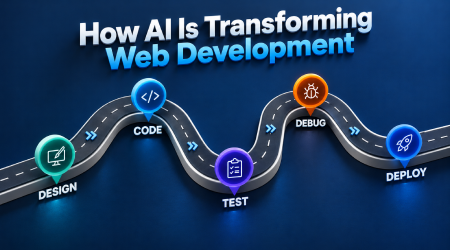
Now, AI is changing almost every step in that process.
Modern AI coding agents can work with project files, understand instructions, search a codebase, make changes across multiple files, run commands, run tests, and use feedback to improve their work. This is very different from traditional autocomplete, where AI simply suggests the next line of code.
AI in web development is now about more than code generation.
AI agents can help developers:
- Build website components.
- Build and customise UI layouts.
- Turn development ideas into working features.
- Catch bugs.
- Write tests.
- Update existing code.
- Explain unfamiliar codebases.
- Improve accessibility.
- Create documentation.
- Automate repetitive development tasks.
The outcome? Less time spent on repetitive implementation and more time for product thinking, architecture, reviewing code, and making decisions.
But here’s the catch: faster code isn’t necessarily better code.
Before AI: Design → Code → Test → Debug → Deploy.
With AI: Plan → AI-assisted coding → Testing → Human review → Deploy.
What Are AI Coding Agents?
An AI coding agent is an AI-powered system that can take a development goal, determine the steps required to achieve it, use software development tools, modify code, and assess the results.
Think of it like this.
Traditional AI Assistant
You ask:
Write a React component for a login form.
The AI generates the code, and you decide what to do with it.
AI Coding Agent
You ask:
Add a secure login flow to this application.
The agent may then:
- Explore the existing project.
- Search for relevant files.
- Understand the current architecture.
- Add or modify authentication logic.
- Run development commands or tests.
- Check for errors and attempt fixes.
- Show you the changes for review.
This agent-based workflow involves the model, the tools available to it, and the instructions and context that guide its actions. You can explore the concept further in the Cursor documentation.
To put it simply:
- AI assistant = gives you an answer.
- AI agent = works through a task using available tools.
That distinction is at the heart of modern AI-powered web development.
How Web Development Is Changing with AI
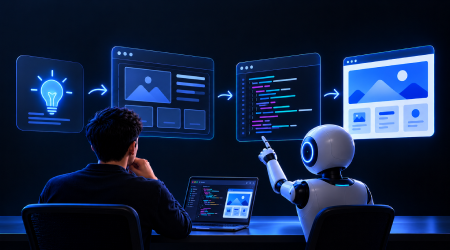
AI is not affecting just one part of web development. It is influencing the entire workflow.
Programming with AI
Developers can use agents to create boilerplate code, build features, refactor existing code, create components, and work across multiple files.
Instead of spending an hour building repetitive structures, a developer can describe the requirements and let an agent handle much of the implementation.
The developer still needs to review the generated changes rather than accept them blindly.
AI-Driven Web Development and Design
AI is also changing how developers create interfaces.
Developers can provide a reference, describe a visual style, or explain the user experience they want. AI can help turn those requirements into HTML, CSS, JavaScript, React components, or other framework-based implementations.
This makes AI particularly useful during prototyping.
A rough idea can become an interactive prototype much faster, allowing teams to experiment with different layouts and user flows.
Testing
Testing is another area where agents can help.
An agent can generate test cases, run existing tests, analyse failures, and suggest fixes. Some workflows also let agents interact with a live browser to inspect how a website actually behaves.
Google’s Beyond Vibe Coding for the Web guide highlights the importance of browser-based verification because code that looks correct may still contain broken layouts, inaccessible controls, or runtime issues.
Debugging
Instead of asking only, Why doesn’t this code work?, developers can provide an agent with relevant code, error messages, and project context.
The agent can investigate possible causes, make changes, and rerun appropriate checks.
This iterative approach is also discussed in Microsoft’s developer resources on how AI coding agents use development tools and context.
AI-Driven Workflow for Web Design: From Concept to Deployment
One of the biggest changes is that AI can now participate in multiple stages of the development lifecycle.
Here is a practical workflow.
Step 1: Define the Concept
Don’t start with code. Start with the problem.
Explain:
- What are you building?
- Who is it for?
- What should users be able to do?
- What technical limitations must be considered?
A clear problem statement gives the agent a better starting point.
Step 2: Develop a Specification
Don’t simply give the agent a vague prompt. Define the requirements, acceptance criteria, design expectations, and technical constraints.
More specific instructions give the agent better context and make its output easier to evaluate.
Step 3: Build a Prototype
Use AI to explore layouts, components, interactions, and user flows.
This is where AI-assisted web development can make experimentation much faster. You can compare different approaches before committing to a full implementation.
Step 4: Build the Feature
Once the requirements are approved, ask the agent to implement the feature.
Break larger tasks into smaller, manageable pieces of work. This makes changes easier to review and problems easier to isolate.
Step 5: Test the Application Run the relevant checks, such as:
- Unit testing.
- Integration testing.
- Type checks.
- Linting.
- Browser testing.
- Accessibility testing.
Testing should reflect how the website is expected to behave, not simply whether the code compiles.
Step 6: Review the Changes
Inspect the actual changes instead of judging the result only by whether the application runs.
Ask:
- Is the code secure?
- Is it maintainable?
- Does it fit the existing project architecture?
- Has the agent introduced unnecessary complexity?
- Does the feature behave as expected?
Step 7: Deploy
Production deployment should happen only after appropriate testing and human review.
A useful rule to remember is:
Plan → Build → Test → Review → Deploy
Google’s web development guide provides further guidance on planning, implementation, testing, and browser verification.
Best AI Tools for Web Developers in 2026

There is no single best AI development tool for every developer. The right choice depends on whether you need an AI-first editor, a terminal-based coding agent, code completion, rapid prototyping, or support across a broader development workflow.
Here are some key options to explore.
Cursor
Cursor is an AI-powered development environment designed to help developers explore codebases, edit multiple files, and work through more complex coding tasks.
Official resource: Cursor documentation
OpenAI Codex
OpenAI Codex supports agentic coding tasks, helping developers work on software implementation and other engineering activities.
Official resource: OpenAI Codex
Claude Code
Claude Code is a coding agent that works with terminal-based development workflows and can interact with project files and development tools.
Official resource: Claude Code documentation
GitHub Copilot
GitHub Copilot offers AI-assisted coding and developer workflows, with capabilities that can help developers write, understand, and modify code.
Official resource: GitHub Copilot documentation
Google AI Development Tools
Google offers AI-powered development tools and agent-based workflows that support coding and web development tasks.
Official resource: Google AI for Developers
Aider
Aider is an AI pair-programming tool that works from the terminal and helps developers make changes to existing codebases.
Official resource: Aider documentation
When comparing AI tools for web development, don’t choose one simply because it generates code quickly. Consider whether it fits your workflow, gives you enough control, and makes it easy to review and test changes.
Image suggestion: A comparison table or visual grid featuring Cursor, OpenAI Codex, Claude Code, GitHub Copilot, Google AI development tools, and Aider. Include each tool’s primary use case.
Why this image? Readers researching tools often want to compare their options quickly. A single visual comparison is more useful than separate decorative images for every tool.
Advantages of AI Coding Agents

Why are developers adopting these tools? Because AI coding agents can change how everyday development work gets done.
1. Faster Development
AI can implement repetitive tasks quickly, helping developers move through routine coding work more efficiently.
2. Greater Developer Productivity
Developers can spend less time writing boilerplate code and more time on architecture, product requirements, and problem-solving.
3. Rapid Prototyping
An idea can become a working prototype more quickly, making it easier to experiment with different approaches before committing to a design.
4. Easier Codebase Exploration
Agents can help developers understand unfamiliar files, functions, and dependencies, making large codebases easier to navigate.
5. Automated Iteration
An agent can make a change, run a test, analyse the error, and attempt another fix.
Developers can review each iteration rather than handling every repetitive step manually.
6. Lower Barriers to Entry
AI tools can help beginners understand unfamiliar technologies, experiment with web development, and get explanations of code they find difficult.
But there is an important difference: AI makes software development easier. It does not eliminate the need to understand software.
Risks and Limitations of AI Coding Agents

One of the biggest mistakes developers can make is confusing speed with reliability.
AI coding agents can produce impressive results, but they can also make incorrect assumptions, introduce security vulnerabilities, use outdated patterns, or modify files unexpectedly.
Google’s Beyond Vibe Coding for the Web guide discusses the need to verify AI-generated work and avoid accumulating technical debt.
Hallucinated Code
An AI agent may confidently suggest an API, library function, or configuration that does not exist or does not work as expected.
Developers should verify unfamiliar functions and check the relevant documentation.
Security Weaknesses
AI-generated code may contain insecure authentication, poor input validation, exposed secrets, vulnerable dependencies, or excessive permissions.
Every security-sensitive change needs careful review.
Prompt Injection Attacks
Agents may process external content from websites, documents, APIs, or repositories.
Malicious content may attempt to manipulate an agent into following unsafe instructions.
The OWASP AI Agent Security Cheat Sheet explains risks such as prompt injection, tool misuse, data exfiltration, excessive autonomy, and supply-chain attacks.
Over-Reliance on AI
If developers stop understanding the code they ship, debugging and maintenance become much harder.
Using AI to assist with implementation should not mean surrendering responsibility for the final result.
Technical Debt
Fast code generation can introduce unnecessary abstractions, outdated patterns, poorly understood dependencies, or complicated solutions that become difficult to maintain.
The rule is straightforward:
Don’t outsource responsibility just because you outsourced execution.
Responsible Use of AI by Developers
The best developers will not necessarily be the ones writing the longest prompts. They will be the ones who build strong habits around reviewing and verifying AI-generated work.
1. Give the AI Clear Context
Instead of saying, Create a website,explain:
The goal.
The intended audience.
The technology stack.
The current architecture.
The design requirements.
The technical limitations. The expected behaviour.
The more relevant context an agent receives, the easier it is to evaluate whether its proposed solution meets the requirements.
2. Think First, Code Later
For larger features, ask the agent to prepare a plan or specification before making changes.
This helps you identify misunderstandings before they turn into implementation problems.
3. Check Every Major Change
Treat AI-generated code as you would code written by another developer.
Review the differences, understand what changed, and question unnecessary modifications.
4. Test, Then Trust
A successful build does not automatically mean an application works correctly.
Test edge cases, accessibility, security, and real user journeys.
5. Apply the Principle of Least Privilege
Give an AI agent only the permissions it needs to complete its task.
For high-impact actions, use scoped tools, explicit authorisation, input validation, and human supervision. See the OWASP AI Agent Security Cheat Sheet.
6. Protect Secrets
Do not casually expose API keys, passwords, private credentials, production databases, or sensitive files in an AI workflow.
Use appropriate secret-management practices and keep credentials out of public code.
7. Keep Humans in the Loop
For high-impact or irreversible actions, human approval should be part of the workflow.
AI can speed up the decision-making process, but it should not automatically become the decision-maker.
Why this image? It turns a detailed section into a practical reference that readers can save or share.
How to Add AI to Your Website

If you’re wondering how to integrate AI into a website, the first step is deciding what you want the AI to do.
AI in web technology is not limited to the tools developers use. It can also power features that website visitors interact with directly.
For example, a website might include:
An AI chatbot.
AI-powered search.
Content generation features.
Recommendation systems.
Document analysis.
Image generation.
Personalised experiences.
Natural-language website interactions.
What Does a Basic AI Website Architecture Look Like?
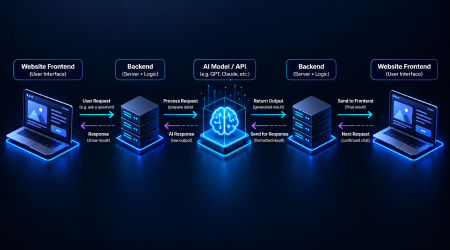
A simple architecture is:
Website Frontend → Website Backend → AI Model/API → Website Backend → Website Frontend
The frontend collects user input, the backend processes the request and communicates with the AI service, and the response is returned to the user.
Step 1: Define the AI Functionality
Be specific about the problem you want to solve.
Instead of saying, I want AI on my website, define a clear requirement:
I want visitors to ask questions about our products and receive answers based on our approved product information.
Step 2: Select the Model or API
Choose an appropriate AI provider and model based on cost, response time, privacy requirements, and expected output quality.
Step 3: Develop the Backend
Keep sensitive API credentials on the server rather than exposing them in frontend code.
The backend should handle requests, enforce access controls, and apply the appropriate validation.
Step 4: Connect the Frontend
Build the user interface through which visitors interact with the AI feature. This might be a chat window, a search box, or a recommendation panel.
Step 5: Install Guardrails
Define what the AI can do, what it cannot access, what information it can provide, how errors should be handled, and which actions require approval.
Step 6: Test the Feature
Test normal requests, unexpected inputs, and potentially malicious requests. Check whether the feature behaves safely and reliably.
Step 7: Monitor the Feature
After deployment, monitor output quality, response times, failures, costs, and security issues.
Deploying AI on a website is not just a matter of making an API call. The difficult part is building a reliable system around that AI capability.
What AI Cannot Replace in Web Development
AI can write code. But it cannot take complete responsibility for whether a product should exist, what problem it should solve, or how its decisions affect users.
Those decisions still require human judgement.
AI does not automatically understand:
- Business priorities.
- Ethical trade-offs.
- User psychology.
- Organisational context.
- Legal obligations.
- Brand positioning.
- Long-term architecture.
- Product strategy.
An agent can build exactly what you asked for and still build the wrong thing if the original requirement was flawed.
That is why the future of web development is more likely to be humans working with AI, not humans competing against AI.
The developer’s role increasingly includes planning, architecture, reviewing, debugging, and decision-making not just writing code.
The Future of AI-Powered Web Development
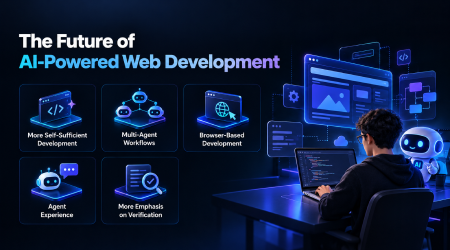
The next phase of AI in web development will likely go beyond generating individual components. Several trends are already shaping the direction of development workflows.
More Self-Sufficient Development
Agents are becoming more capable of handling larger tasks with less continuous guidance. However, the level of autonomy depends on the tool, task, and permissions provided.
Multi-Agent Workflows
Different agents may handle different responsibilities, such as planning, coding, testing, research, and review.
Browser-Based Development
AI agents can interact with live websites and browser development tools to inspect actual behaviour rather than relying only on source code.
Agent Experience (AX)
As agents become users of developer tools, the way APIs, software development kits, and command-line interfaces are documented and structured becomes increasingly important.
Microsoft discusses this shift in its article on how AI coding agents use development tools.
More Emphasis on Verification
As AI becomes better at generating code, verification becomes even more important. Developers must ensure that the output is correct, secure, maintainable, and aligned with user needs.
The development workflow may increasingly look less like:
Write → Debug → Deploy
And more like:
Specify → Generate → Verify → Review → Iterate → Ship
FAQs
1. What Is an AI Coding Agent?
AI coding agents are AI-powered systems that can understand development goals, explore a project, modify files, use development tools, run commands or tests, and iterate towards a
solution. Unlike basic autocomplete, they can work across multiple steps and files.
2. What Is the Effect of AI on Web Development?
AI is transforming web development by assisting with coding, design, testing, debugging, documentation, prototyping, and deployment workflows. Developers can delegate repetitive implementation tasks while spending more time on planning, reviewing, and technical decisions.
3. What Are the Best AI Tools for Web Developers in 2026?
Some options include Cursor, OpenAI Codex, Claude Code, GitHub Copilot, Google’s AI development tools, and Aider. The right choice depends on your workflow, technology stack, desired level of autonomy, and security requirements.
4. How Can Developers Use AI Responsibly?
Developers should provide clear requirements, review generated code, test changes, protect sensitive information, limit agent permissions, and maintain human supervision for high-impact actions. The OWASP AI Agent Security Cheat Sheet provides further security guidance.
5. What Is the Future of AI-Powered Web Development?
AI agents are likely to take on more implementation, testing, debugging, and tool-assisted development tasks. Developers will continue to play important roles in architecture, product decisions, validation, security, and oversight.
6.How Can You Add AI to a Website?
Identify the functionality you need, select an appropriate AI model or API, develop a secure backend, connect the frontend, implement guardrails, test the feature, and monitor it after deployment.
7. How Do You Deploy AI on a Website?
A common approach is to connect the website frontend to a backend that sends user input to an AI service, processes the response, and returns it to the user. Keep API keys and sensitive credentials on the server, test the system thoroughly, and monitor its performance after deployment.
Conclusion
Developers + AI, Not AI vs. Developers
AI coding agents are redefining how websites and web applications are built.
The biggest change is not simply that AI can write code. It is that AI can increasingly participate in the wider development process.
You can describe a product, write a specification, prototype an interface, generate code, run tests, debug problems, and improve the result with an AI agent working alongside you.
But the developers who benefit most will not be the ones who blindly say, “Create it, AI.”
They will be the ones who know how to plan, prompt, inspect, test, secure, and improve the output.
The real skill of modern web development is not just knowing how to generate code. It is knowing how to judge whether that code is worth shipping.
AI can help developers work faster. Developers still need to think carefully.
Further Reading and References
These resources provide additional technical and security guidance.
- OWASP AI Agent Security Cheat Sheet Read the guide. Covers agent security risks, least-privilege access, prompt injection, and human oversight.
- OpenAI Help Center Using OpenAI Models in Cursor Read the documentation. Provides information on using OpenAI models in Cursor.
- Google Codelabs Beyond Vibe Coding for the Web Read the guide. Explores agentic web development workflows, planning, testing, and browser verification.
- Microsoft for Developers How AI Coding Agents Really Use Your Technology Read the article. Discusses context, tools, and agent workflows in software development.

A reputed training and placement institute,offering career-focused learning in information technology and other professional fields. Through its blog, the team shares practical insights on technology trends, industry-relevant skills, career opportunities, and professional development to help students and aspiring professionals make career decisions.